Kitchen notes
What we changed about our blog to double our traffic in 1 month
If you’re struggling to grow your blog traffic, the 5 steps outlined in this post can help. Last July we had a real nice bump in our traffic. In less … Read more

If you’re struggling to grow your blog traffic, the 5 steps outlined in this post can help.

Last July we had a real nice bump in our traffic. In less than a month our page views had doubled, even though we posted only twice that month.
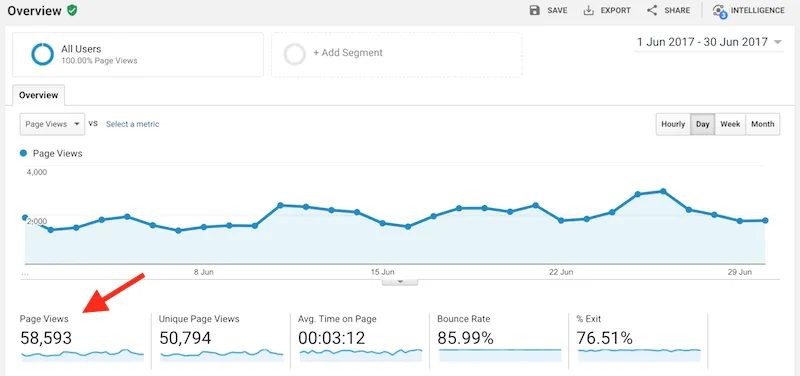 Our Blog Traffic in June
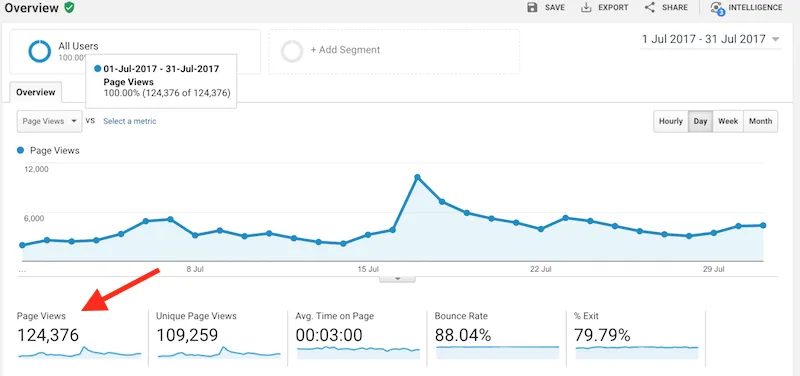 Our Blog Traffic in July
While we didn’t put out new content consistently in July, we didn’t just stay there doing nada. There were days we'd spent 10 hours at our desk until our eyes were bleeding.
The result?
A nice little hunchback and traffic that doubled itself.
Now, we'll save the advice on how to get a hunchback for another post, but here are 5 things we did to BAM, explode our traffic.
5 Things we Did To Double Our Traffic In One Month
For Newbies: If you feel like you never know enough to start your own blog you might want to check out our free Step-By-Step Blogging Guide For Beginners teaching you how to launch your blog with a cheap and extremely reliable hosting (get 60% off) and the two most important keys to become a successful blogger.
1. We Created Beautiful, LONG Pins And Added Them To Our Blog Posts
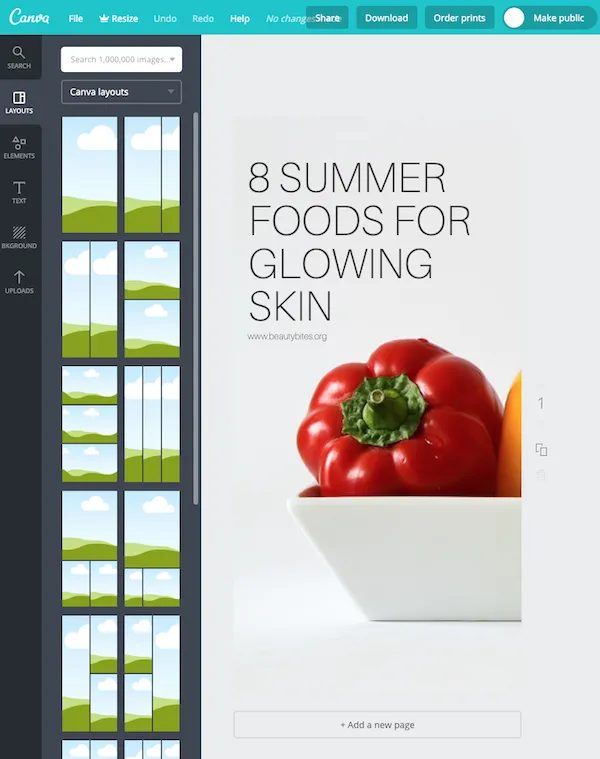
This did kinda work for a while, but there was a problem.
Because the people who actually came to our blog did not have that pin to repin from the post. There were only our horizontal pictures, which people would pin, but then nobody else would repin later. So in June, we started creating bright and colorful vertical pins in Canva and uploaded them to our blog.
Now, when people came they repinned that beautiful pin and it got more popular because also their followers would repin it. We added 2-3 pins per blog post.
That month we got 5 viral pins. Which brought a lot of traffic.
We did this with most of our older posts and made sure to include text on there that solves someone’s need or is something people search for.
Pinning and repinning did take a while, so now that we have even more pins we use a scheduling tool to schedule our pins ahead and stay consistent.
2. We Added Alt Text To Our Images
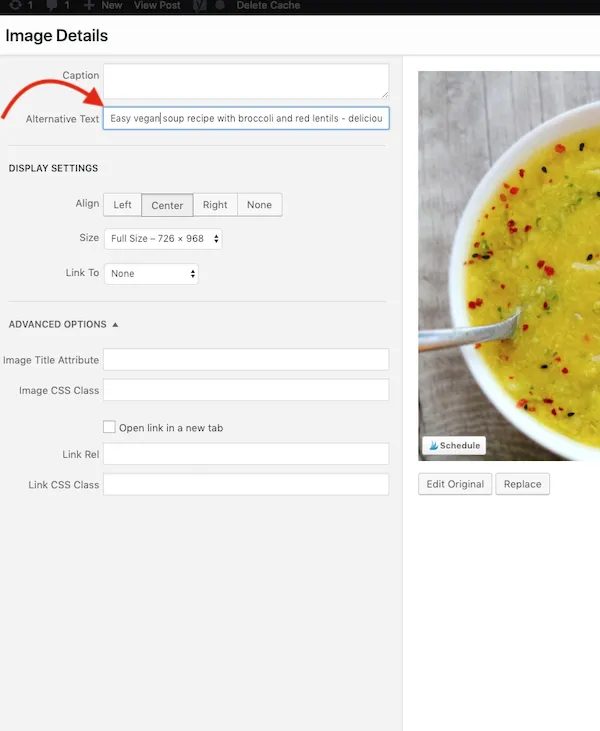
Can you believe we never cared much about the description to our pins and thought SEO is a myth? Oh, yes we did.
In our pin description we would just write something like: Soup with spinach and bulgur.
Not that many.
Simple vegan soup recipe? That’s better.
That’s bad because when people pin from our blog, the description would be whatever the name of the picture was. And sometimes it was IMG_467323784368. How many people look for that?
When we uploaded our new pins to our site, we also put alt tags for the first time.
When people look for those exact same words, that pin is more likely to show up.
3. Improved Our Uptime And Site Speed
Uptime = 100% with Siteground for 1 yearOkay, having your site up and running is important for you to get traffic, right? We mean duh. Good site speed is another essential for more blog traffic.
We didn’t have both of those things for a while. We tried everything – smushing our images, not displaying images, having a minimal site and yet our site would be slower than a snail.
We knew we didn’t have a reliable hosting, but the thought of switching to a new one and transferring all our site scared the crap out of us. So we put it off every single month.
Then we had Jetpack check our site for downtime and it turned out that our site was down every night for 8-10 minutes.
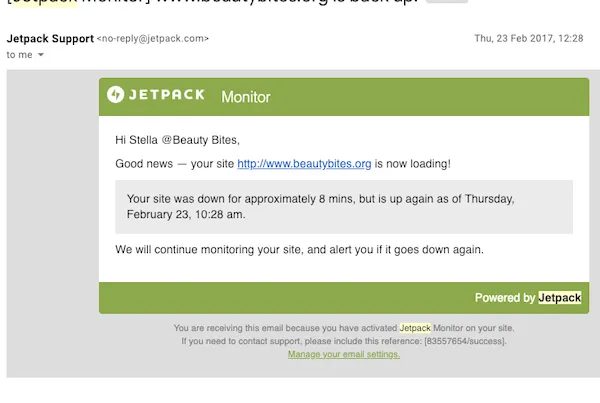 This was a message we got every day from Jetpack
So we HAD to face our fears and deal with this now.
We needed to get better hosting and figure out how to transfer that site. We looked at a number of hosting plans and had a slight breakdown, trying to decide which hosting to get.
But finally we decided to go with Siteground because they are cheap and had all the things we needed:
Siteground offers free site transfer, which was solid for us- Free site transfer! We dislike spending money (we're getting better!) and we definitely didn’t want to pay for transfer or spend time doing it. Siteground took care of it all for us and it was such a relief.
- 99.99% Uptime. They have a reliable uptime with 99.99%. For the last year ours has been 100%, which is awesome. We've not gotten a Jetpack message like this since we switched.
- Faster loading time – our site speed did improve, even though we're adding way too many images now and having more traffic.
- notable customer support that is 24/7 – we usually use the chat, because we never feel like talking on a phone – but you can do both.
If you already have a good amount of traffic (more than 30.000 PV) and want to change blog hosting – we highly recommend purchasing the GrowBig Plan by Siteground because it’s cheap, reliable and you can get a free site transfer with it (usually it costs like $100). Here’s the link you can use for free site transfer.
4. Bought A Faster And More Engaging WordPress Theme
Many options at StudioPress: we chose Genesis and Divine Theme for multiple reasons, but a big one: they’re all SEO friendly (HUGE!)We used a free WordPress theme for 2 years. During that time we didn’t make any money and we started getting traffic only 1.5 years after we started. A free WordPress theme isn’t bad if you’re just starting out, but we were almost 2 years in and this decision affected our SEO, site speed and engagement.
So, finally, we decided to invest while crying a little inside. It’s funny how we would spend a lot of money on food and coffee, but when it came to something we wanted to do and something we could actually make money with one day, we were stingy and afraid to make an investment.
We decided to go with Genesis as so many people recommended and chose the Divine Child theme. Within a month (!) our site started to rank higher in google and our bounce rate decreased.
We've heard notable things about Genesis and they turned out to be true. We chose this child theme, because it was so versatile. We loved how simple it was to customize and that it allowed us to showcase most of our content, so we can keep our audience more engaged.
5. We Joined New Group Boards On Pinterest
You can use Pingroupie to find new group boards on PinterestWe were a member of many recipe group boards, but not so many health, fitness or general group boards. So, our health & fitness content suffered a lot and wouldn’t have any shares. We did some research by taking a look at Pingroupie and also by checking out the group boards of other pinners in our niche.
Then we asked the groups we liked for invites via email. We got accepted to about 90% of the boards and this exposed our pins to a brand new audience.
So that is pretty much it! If you want to grow your traffic quickly: 1) build a great foundation; 2) stay consistent 3) try to improve as you go and it will pay off!
We hope this post helps you focus on the right things when trying to grow your blog traffic! Let us know if you have any questions. And if you have even more suggestions, please share, we'd love to hear them, we think it’s safe to say we’re all always looking for ways to grow 🙂